Double-booking in a repair shop rarely happens because someone was careless. It happens because the schedule answers the wrong question. A calendar of appointments tells you when customers are coming. It does not tell you when a lift is free.
The fix is to schedule the lift, not the customer. This guide walks through how, with a worked example from the sample shop in our demo, Northside Auto, whose Downtown branch has Lift 1, Lift 2, Lift 3 and an alignment bay.
Why lifts are the real constraint
A technician can juggle two cars: one waiting for a part while the other is on the lift. A lift cannot hold two cars. So the honest capacity of the shop is the number of lift-hours you have, minus the time lost between jobs.
Three things make that capacity slip away.
- Jobs that run long. A seized bolt turns a one-hour job into three, and every booking behind it is late.
- Cars that stay after the work stops. A car waiting for parts that sits on a lift blocks the next booking.
- Walk-ins. An urgent car arrives with no booking and the lift you promised is gone.
Each of these has a planning answer, and none of them needs special software.
Step 1: List your lifts and what each one can do
Write down every lift and bay with one line on what it is for. A two-post lift that fits most cars. A four-post lift for alignments. A bay with a pit for exhaust and underbody work. If a job can only be done on one lift, that lift is your bottleneck, and it deserves the tightest schedule.
At Northside Auto Downtown the alignment bay takes the alignment jobs. Lift 1, Lift 2 and Lift 3 take everything else.
Step 2: Put a length on every kind of job
You cannot book a lift without knowing how long the job will take. Take the work types you sell and give each a normal length.
The numbers below are an example, not a benchmark. Yours will differ with your equipment and your people.
| Work type | Planned length on the lift |
|---|---|
| Oil change | 0.5 hour |
| Brakes | 2 hours |
| Suspension | 3 hours |
| Tyres | 1 hour |
| Diagnostics | 1 hour |
Then correct the table with your own history. Open the last month of finished jobs and compare the length you planned with the length you got. If brake jobs take 3 hours half the time, plan 3.
A booking for a job you have not seen yet is a guess. When the customer describes a problem you cannot size, book the diagnostics slot first and the repair second.
Step 3: Leave a buffer
Add a margin to each booking, and set it from experience. A common rule is to leave one empty slot per lift in the middle of the day so overruns have somewhere to land.
A second buffer works at the level of the day. Keep an hour on one lift open for the urgent car. You will fill it most days. The days you do not, you have time to catch up.
Step 4: Check the lift, then promise the date
Before you tell a customer “Thursday at 10”, look at Thursday for that lift. A list of Thursday appointments hides the fact that three of them need the same lift.
A worked example. A customer calls Wednesday and wants a brake job done on Thursday. Northside Auto Downtown already has:
| Time | Lift 1 | Lift 2 | Lift 3 |
|---|---|---|---|
| 08:00 | Oil change | Suspension | Diagnostics |
| 09:00 | Brakes | Suspension | Tyres |
| 10:00 | Brakes | Suspension | Oil change |
| 11:00 | Free | Free | Free |
Brakes need two hours. Lift 1 is free from 11:00, and so are Lift 2 and Lift 3. A 10:00 booking would collide on every lift. An 11:00 booking works on any of them. A list of start times would show a single car starting at 10:00 and look fine, yet every lift is busy at that hour.
The rule: promise a start time only after you have found a lift that is empty for the whole length of the job.
Step 5: Decide what happens when a job overruns
Decide before it happens, because deciding while a customer waits goes badly. A simple order of moves:
- Tell the customer whose car is next, early. A call at 10:00 saying “we will be an hour late” is better than a surprise at 11:00.
- Move the next job to another lift if one is free.
- If no lift is free, move the next job and say so, rather than letting it start late without a word.
- Record what overran. This feeds step 2.
Step 6: Keep cars that are not being worked on off the lift
A car that waits for a part should leave the lift if the part is not coming today. Parking space is cheaper than lift time. Mark it with the stage that says it is waiting, and the lift becomes available again for the next booking.
Do it on paper or in a spreadsheet
A paper diary with one column per lift works. Draw hours down the side and write bookings in pencil. A spreadsheet works for one person editing at a time. The problem with both is that they depend on the person looking. Nothing warns you when two jobs overlap on a lift.
Doing it in the app
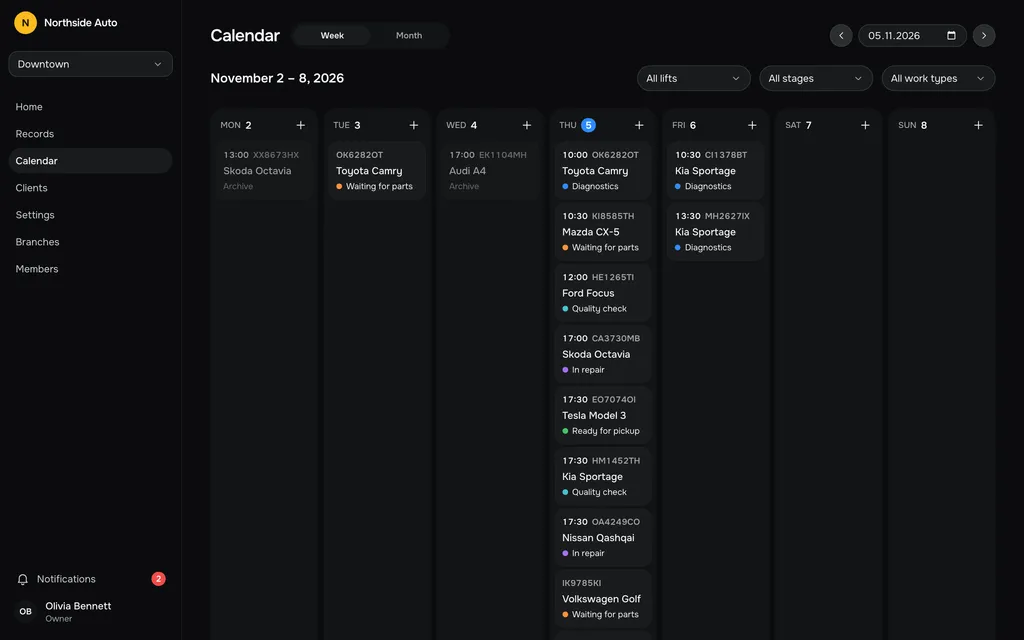
The calendar in our repair shop software is built for the check in step 4. The week view puts each record at its day and time, starting on Monday and always showing seven days. You can filter it by lift, stage or work type, so looking at Lift 2 on Thursday is two clicks. The month view shows how many cars are booked on each day. Pick a day and add a record there, and it lands on the board and in the records list, because it is the same record.
The board is the other half of the picture. Open any day on the board and it shows one column for each lift of that branch, in the order of the service catalog. A day picker moves between dates. The calendar’s day headings lead to that day on the board.
One honest limit. The app does not block you from putting two cars on the same lift at the same time. It shows both cards, and the check in step 4 is yours to make. The lift filter on the calendar is what makes that check quick.
You can test this on the demo’s sample data. It holds about ninety records from four weeks back to three weeks ahead, so the calendar is never empty.
A one-page routine
If you take only one thing from this guide, take this routine.
- Give every lift a name and write down what it can do.
- Give every work type a planned length, and fix it monthly from real jobs.
- Before promising a time, find a lift that is empty for the full length.
- Keep one open hour on one lift for the urgent car.
- When a job overruns, call the next customer first.
- Move cars that are waiting for parts off the lift.
Questions people ask
How much buffer should I leave?
Measure it. Look at last month’s jobs and see how often and by how much they ran over. Set the buffer to cover the usual overrun, not the worst one.
Does the app stop two cars being booked on the same lift?
No. Both cards are shown, and you decide. The calendar can be filtered by lift to check before you promise a time.
Can I schedule by technician instead of by lift?
The board and calendar are organised by lift, stage and work type. There is no per-technician schedule. If the technicians are your real constraint, plan them on paper next to the lift view.