A repair shop board is one picture of every car that is in the shop today. Done well, it ends the questions that eat a service writer’s day: which lift is the Camry on, is the Civic still waiting for parts, who has the keys to the pickup. Done badly, it is a second place to keep stale information.
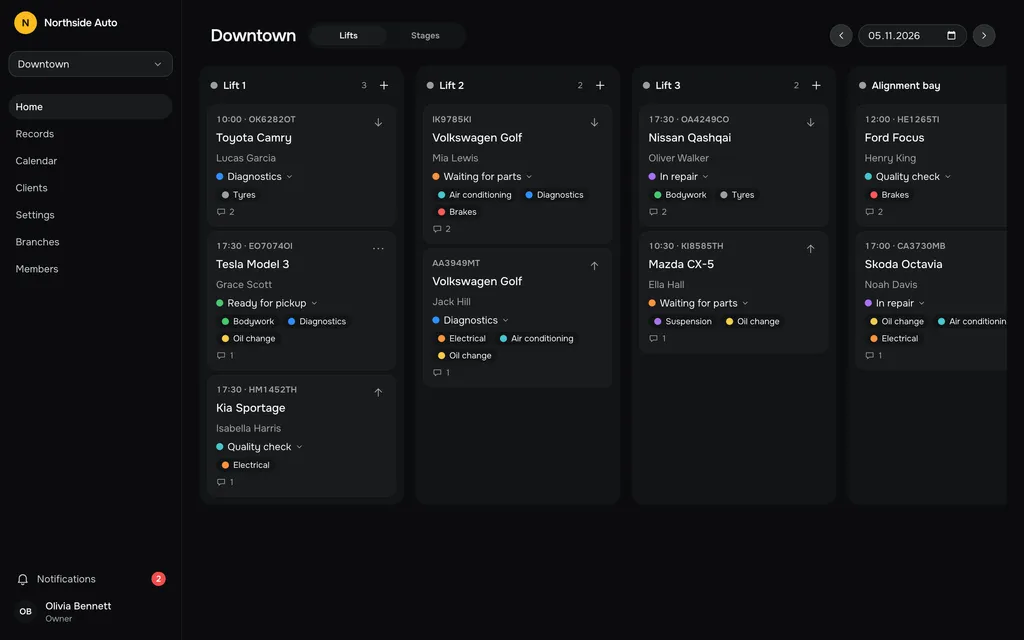
This guide shows how to build a board that stays true. It works on a whiteboard, a wall of magnets or an app. The examples use the sample shop from our demo, Northside Auto, which has a Downtown branch with Lift 1, Lift 2, Lift 3 and an alignment bay.
What the board has to answer
Every question asked across the counter or over the radio falls into one of two groups.
The first group is about places. Which car is on Lift 2 right now? Is the alignment bay free? What is next for Lift 3? The answer is a lift, a bay or a parking spot.
The second group is about progress. Which cars are waiting for parts? What is ready for pickup? What did we finish this morning? The answer is a stage in the life of the job.
One flat list cannot answer both well. That is why a good board offers two views of the same cards.
Two views of the same cards
| Question | View | Columns |
|---|---|---|
| What is each bay doing right now? | By lift | One column per lift or bay |
| Where is work stuck? | By stage | One column per stage |
| Can I take another car this afternoon? | By lift | Look for the short column |
| What can I call customers about today? | By stage | The ready-for-pickup column |
The important word is “same”. A car is one card. When it moves from Lift 2 to the alignment bay, it moves in the lift view. When it moves from “In repair” to “Quality check”, it moves in the stage view. Nobody should have to update two boards.
Step 1: Name your lifts
List every place a car can sit while someone works on it. Lifts are the obvious ones. Add the alignment bay, the wheel station, the pit, and an outdoor spot if you use one.
Keep the names short and the way staff already say them. “Lift 1” beats “Service Bay A, Hydraulic Two-Post”. At Northside Auto Downtown the columns are Lift 1, Lift 2, Lift 3 and Alignment bay.
If a car waits for a customer’s decision and does not need a lift, give it somewhere to be on the board anyway. A column called “Parking” or “Yard” stops those cars from vanishing.
Step 2: Pick four to six stages
Stages describe where a job is in its life, from the shop’s point of view. Pick them by asking one question: who has to do something next?
The demo shop uses five:
- Diagnostics. A technician is finding out what is wrong.
- Waiting for parts. The shop is waiting on a supplier or on the customer’s approval.
- In repair. Hands are on the car.
- Quality check. Someone other than the repairer verifies the work.
- Ready for pickup. The customer can be called.
Notice that each stage has a different person or team responsible for the next move. If two stages have the same owner and the same next action, merge them.
Do not turn every task into a stage. “Oil drained” and “filter replaced” are steps inside “In repair”. A board with fifteen stages gets updated by nobody.
Keep work types separate from stages
A work type says what is being done: oil change, brakes, suspension, tyres, electrical, air conditioning, bodywork. A stage says where the job is. Mixing them produces stages like “Brakes in progress”, and the board grows a column for every kind of work you sell.
Treat work types as labels on the card. A car can carry two or three of them. Then you can ask “show me the brake jobs” without changing the columns.
Step 3: Decide what goes on a card
A card has to be readable from two metres away and complete enough that you rarely need to open it. These fields earn their place:
- The plate, which is how people actually refer to cars in the shop.
- The model.
- The client’s name.
- The time the car is expected, if it has a booking.
- The work types, as short labels.
- A one-line description of the problem.
Everything else lives behind the card: phone numbers, history, notes, comments. If the card tries to show all of it, nobody reads it.
Step 4: Run the day from the board
A board only helps if the whole team treats it as the source of truth. A routine makes that happen.
In the morning. Open the lift view and place today’s bookings in the lift where they will be worked. Put walk-ins and cars carried over from yesterday in too. Then switch to the stage view and check that nothing is sitting in “Waiting for parts” without a reason you can name.
During the day. The person who changes the state of a car moves the card, at the moment they change it. Not at lunch, not at the end of the day. A technician who finishes a repair moves the card to “Quality check” before walking to the next car.
Order inside a column. The top card is the next one. If two cars are booked for the same lift, the one that goes first sits above the other. Set the order on purpose rather than by arrival time, because the real order often changes when a job runs long.
At the end of the day. Look at the stage view. “Ready for pickup” is tomorrow’s phone list. Anything that should have moved but did not is tomorrow’s first question.
Common mistakes
Too many columns. If a column is empty most days, remove it. If the board needs sideways scrolling on a normal screen, you have more lifts or stages than you can follow at a glance.
The board lags the floor. A board that is an hour behind teaches people to ignore it. Fix the habit before fixing the tool: whoever touches the car moves the card.
No owner for “Waiting for parts”. This is where cars go to be forgotten. Give the stage a rule, for example that every car in it has a note saying what it is waiting for and who is chasing it.
Two people editing one card. On a whiteboard the problem shows up as smudged handwriting. In software it shows up as the second person overwriting the first. A good tool warns you; if yours does not, agree on who owns edits to a job.
Whiteboard, spreadsheet or app
A whiteboard is quick to start and free, and it works for a one-person shop. It stops working when the front desk is in a different room from the workshop, when you have more than one branch, or when you need to know what was on the board last Tuesday.
A shared spreadsheet fixes the distance but not the speed. Sorting and filtering are easy, but moving a car between lifts is several clicks, and two people typing in one row is how data gets lost.
An app built for the job gives you the two views, one card per car, and live updates. That is where the product behind this blog fits.
Running this in the app
Our workflow board follows the setup above. The board has a switch between Lifts and Stages, and the same cards regroup. Cars are dragged between columns, and on a phone each card has a handle for dragging as well as Up and Down controls to set its place in the column. The order inside a column is set by hand and is kept separately for the lift view and the stage view. The time on a card does not decide the order.
Lifts, stages and work types are set up in the service catalog by an owner or admin, each with a colour, and every branch has its own. When a colleague adds or moves a record, your board updates without a refresh. If someone saves a record while you have it open, a banner warns you before you overwrite their changes.
You can try all of this on the sample shop in the demo. Reloading the page resets it, so move cards freely.
Questions people ask
How many stages should a small shop have?
Four to six. Start with what the demo shop uses, then remove any stage that has the same owner and the same next action as its neighbour.
My shop has bays that are not lifts. Do they go on the board?
Yes. A column is just a place where a car sits while work happens. The demo shop lists its alignment bay next to its three lifts.
Should the board show cars waiting for the customer?
Show them. A car that needs a decision from the customer is waiting too, and a “Waiting for parts” stage with a note on the card covers it as long as the note says who has to act.