A customer database in a repair shop has one job: when a client calls or walks in, you know who they are and what you did to their car before they finish the second sentence. Everything else is decoration.
This guide covers what to store, what to leave out, how to keep the data clean and how to search it. The examples come from the sample shop in our demo, Northside Auto.
Three things to store, and how they connect
A useful database has three kinds of records, and mixing them up is the most common design mistake.
- The client. A person, with a name and a way to reach them.
- The vehicles. The cars that person brings in. One client can have several, so the vehicle gets its own record.
- The visits. One record each time a car came in: the date, what was wrong, what was done.
A spreadsheet with one row per visit and the client’s name typed again on each row is the usual starting point. It works until the same client appears as “J. Smith”, “John Smith” and “Smith John”, and nobody can say how many times he has been in.
Keep the three apart and link them. The visit points to a vehicle, the vehicle belongs to a client. A change to the client’s name is then made once and shows everywhere.
What to store about the client
Store what you need to do the job and no more.
- Name. The way you would address them.
- A phone number. In a repair shop this is the best single identifier. People change email addresses and share cars, but the number they call from is the one on the screen when they ring.
- A second phone, for the spouse or the fleet manager who also picks up the car.
- A short note. Something a service writer would want to know: prefers calls before 10, always declines the wheel balance, drives in from the other side of town.
Add an email address if you send anything by email. Leave the field out if you do not.
A loyalty note
Many shops keep a loyalty level or a discount rule for regulars. If you do, store it on the client, not on the visit. A regular is a regular on every visit, and you do not want to retype it.
What to store about the vehicle
- The plate. It is unique and stamped on the car, so staff use it more than the model. Make the plate the vehicle’s key.
- The model, as free text. A dropdown of every make and model is a project you do not need.
Add the year, the engine or the VIN only if your work depends on them. For a shop that does mostly brakes and oil, the plate and model are enough.
Write plates in one format. Capital letters, no spaces, no dashes. “AB 12-34 CD” and “ab1234cd” are the same car, and a database that treats them as two will give you two histories.
What to store about each visit
- The date, and the time if you booked one.
- The vehicle and the client.
- The problem, in the customer’s words or yours.
- The work types: brakes, tyres, oil change, and so on.
- The stage it reached, and who touched it.
- Notes and comments made while the car was in.
The last item matters most over the long run. “Customer declined the new pads, said next month” is worth more on the next visit than a perfect description of the work.
What to leave out
A database is not better because it is bigger. Leave out anything you would be uncomfortable explaining to the customer.
- Documents and ID numbers that the job does not need.
- Guesses about the customer’s mood or finances.
- Anything you copied “just in case”.
Every field is something you must keep correct and keep safe. It also decides who in the shop should be able to see it. Roles help here: the front desk may need more than a trainee does.
How to search
Storing is the easy half. The test of a database is the call at 9:05 on a Monday.
Search needs to work from whatever the person on the phone can tell you. That means four doors into the same record:
- Name. For clients who say who they are.
- Phone. For the number on the screen, and the one most callers will quote.
- Plate. For the car in the yard.
- Model. For “the blue one you had on Friday”.
A search box that takes any of the four, and matches part of a word, saves more time than any filter. Test yours with a stranger: ask them to find a client given only a plate.
Results should show enough to tell people apart without opening each one. Name, phone, the vehicles, and the date of the last visit is a good set. Newest visit first is a good order, because the client who rings is usually the one who was just here.
Keep it clean
Clean data is a habit, not a project.
- Search before you add. The most common duplicate is made by a person who did not look.
- One key. Use the phone number as the client’s key and the plate as the vehicle’s key. If the same phone turns up, it is the same client.
- Fix in one place. When a client changes name or number, change it on the client, and every visit follows.
- Do not delete history. A client who has not been back in two years is still a client. Move them out of the daily list rather than removing them, and bring them back when they return.
Spreadsheet or software
A spreadsheet is a reasonable first database for a small shop with one person entering data. It stops being reasonable when two people edit at once, when you add a second location, or when you want a client’s history without scrolling through all visits.
Look for software that keeps clients, vehicles and visits as separate linked records, searches across all of them in one box, and shows a client’s full history on one page.
Doing it in the app
This is the structure of the client database in our software. Clients belong to the company, so a visit at one branch appears in the history seen from another. A client has as many vehicles as they own, each with a plate and a model.
When you add a repair record, you start with the client’s phone. If the number is known, the form finds the client and offers to fill in the name, second phone, loyalty and vehicle. If you choose a new plate, the form tells you that the car will be added to the client, and a plate that already belongs to another client is rejected.
The Clients page has one search box that matches name, phone, plate and model. The list shows each client’s phone, vehicles, last record and total records, with the most recent visit first. Open a client to see the history of records across every branch, newest first. The app records who last changed a client’s details and when.
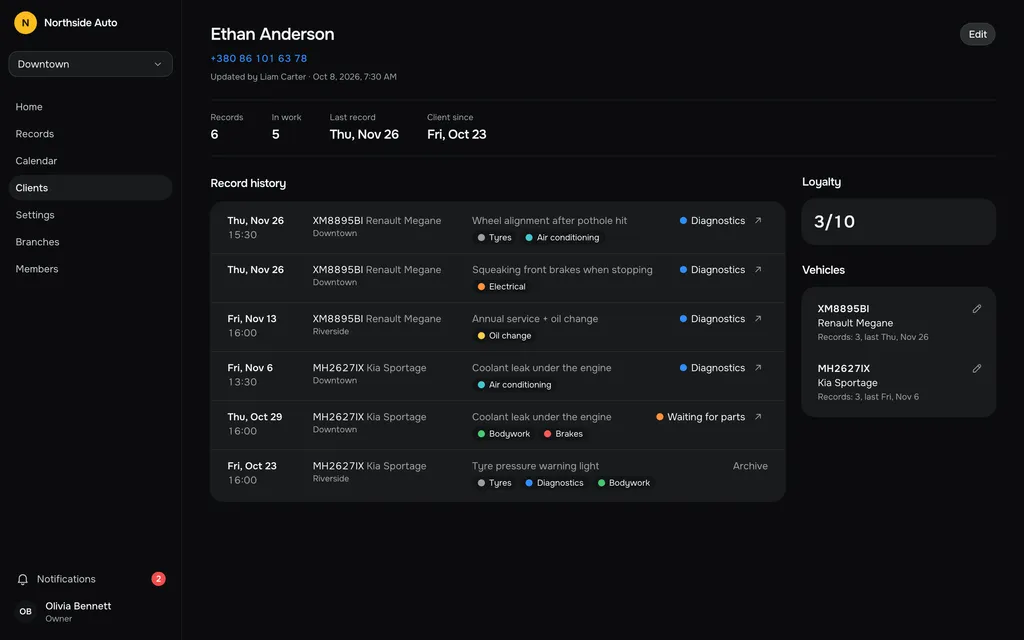
A client with no records in work can be archived, which takes them out of the list. They come back by themselves the next time a record is added with their phone, or you can restore them from the archive tab. Clients cannot be deleted, and a vehicle can be deleted only when it has no records.
The demo has about 25 clients and 90 records, so you can try the search before you decide whether this structure suits your shop.
Questions people ask
Should I store email addresses?
Only if you use them. The app asks for phone numbers, because that is how repair shops reach people. Do not collect a field you do not intend to use.
What if two people share a car?
Give the car to the client who brings it in and put the other person’s number in the second phone field, or note their name on the visit.
Can I merge two duplicate clients?
Not in the app today. Merging and deleting clients are not available, which is why searching before adding is worth the extra second.